


Tag Archives: Metatrader 4
When it comes to online trading, the mt4 trading platform remains one of the most trusted and widely used platforms across the globe. Known for its stability, user-friendly interface, and powerful analytical tools, it offers traders a complete solution for managing trades efficiently. Whether you are a beginner exploring the basics or an experienced trader using advanced strategies, MT4 delivers the flexibility and reliability that modern trading demands.
Pros of Using MT4
One of the main advantages of MT4 is its balance between simplicity and depth. The platform is designed to cater to all types of traders by offering customizable features and intuitive navigation. Its lightweight structure ensures smooth performance even on standard computer systems, allowing trades to be executed quickly and accurately. MT4 is also compatible with mobile devices, enabling users to trade anytime, anywhere. Another notable benefit is its strong security framework, which uses advanced encryption to protect data and financial transactions.
Key Features and Tools
MT4 comes equipped with a rich set of analytical tools that help traders understand market behavior. It supports multiple chart types, timeframes, and more than 30 built-in indicators. These tools allow users to track price movements, analyze patterns, and forecast potential trends with precision. Additionally, the platform supports automated trading through Expert Advisors (EAs), giving traders the ability to develop, test, and apply their own trading algorithms. This automation helps remove emotional bias and enhances trading consistency.
Functionality and Performance
MT4’s interface is clean and efficient, making it easy to navigate for both beginners and advanced users. The platform’s order execution system is designed to handle fast-moving markets, ensuring minimal delays and accurate results. Its comprehensive history database and real-time data feeds provide traders with valuable insights for backtesting and strategy development. Furthermore, MT4 allows full customization, letting users arrange windows, charts, and indicators according to their trading style.
Final Thoughts
In summary, MT4 continues to be a benchmark for trading platforms worldwide. Its combination of functionality, reliability, and flexibility has made it a preferred choice among traders of all levels. With its advanced analytical capabilities, secure trading environment, and user-friendly design, MT4 stands out as a professional-grade platform that empowers traders to make informed and confident decisions in the financial markets.
The MT4 trading platform has established itself as a cornerstone for Forex and CFD traders due to its versatility, advanced features, and user-friendly interface. Beyond basic trade execution, mt4 trading platform offers a wide array of tools that, when leveraged strategically, can enhance trading performance, improve decision-making, and optimize overall market engagement. Understanding how to utilize these tools effectively is essential for traders aiming for consistent success.
Advanced Charting for Market Analysis
MT4 provides powerful charting capabilities that allow traders to visualize market movements in real time. Multiple chart types, including candlestick, bar, and line charts, help identify trends, reversals, and potential trade setups. Additionally, traders can adjust timeframes from minutes to months, offering both short-term and long-term perspectives. Combining charts with technical indicators, such as Moving Averages, Bollinger Bands, and Relative Strength Index (RSI), enables traders to analyze market momentum and develop precise entry and exit strategies.
Technical Indicators for Informed Decisions
The platform offers over 30 built-in technical indicators and supports custom indicators tailored to specific strategies. Indicators help monitor price trends, detect volatility, and generate actionable signals. For instance, combining trend-following and oscillating indicators allows traders to validate trade opportunities and manage risk more effectively. Mastering the use of these analytical tools helps traders anticipate market movements and maintain a strategic approach.
Automation with Expert Advisors (EAs)
One of MT4’s most valuable tools is its support for automated trading through Expert Advisors. EAs allow traders to implement pre-defined strategies that execute trades automatically based on specific conditions. This reduces emotional decision-making, ensures consistency in trade execution, and enables traders to monitor multiple instruments simultaneously. Automation is particularly useful for managing complex strategies and capturing market opportunities around the clock.
Alerts and Notifications
Timely responses to market changes are critical for strategic trading. MT4 allows users to set custom alerts for price levels, indicator triggers, and other trading conditions. Alerts can be received as on-screen notifications, emails, or push messages, ensuring that traders remain informed without constantly monitoring the platform. This functionality enables more efficient decision-making and helps manage trades proactively.
Efficient Trade Management
MT4 simplifies trade management with features such as one-click trading, customizable order types, and real-time account monitoring. Traders can modify stop-loss, take-profit, and position sizes quickly, improving efficiency during volatile market periods. Streamlined trade management reduces execution errors and supports disciplined trading practices.
In conclusion, leveraging the MT4 trading platform tools allows traders to adopt a strategic, data-driven approach to the Forex and CFD markets. By utilizing advanced charting, technical indicators, automation through Expert Advisors, timely alerts, and efficient trade management, traders can enhance market analysis, optimize performance, and execute strategies with confidence. Mastery of MT4 tools is a key factor in achieving consistent trading success.
The MT4 trading platform is renowned for its flexibility and extensive features, making it a favorite among traders worldwide. One of the platform’s greatest strengths lies in its ability to be customized to suit individual trading styles and preferences. Tailoring your mt4 trading platform setup not only enhances your trading efficiency but also improves decision-making, helping you achieve better results.
To begin with, the customization of charts is a fundamental step. MT4 allows you to modify chart types—such as candlestick, bar, or line charts—and adjust timeframes to suit your trading strategy. Whether you prefer short-term intraday trading or longer-term analysis, setting up charts that align with your approach can significantly improve clarity. Adding technical indicators like Moving Averages, Bollinger Bands, or MACD is also crucial. These tools assist in identifying trends and potential entry or exit points. Traders can customize the appearance of these indicators by changing colors and line thickness to make the charts easier to read.
Another key aspect of customization is managing the workspace layout. MT4 lets you open multiple charts simultaneously, enabling you to monitor different instruments or timeframes in one view. Organizing your workspace by arranging these charts logically can reduce clutter and help you focus on critical data. Saving your preferred layout means you don’t have to rearrange your workspace every time you log in, creating a consistent trading environment.
Customizing the order execution interface is equally important. MT4 provides various order types including market, limit, and stop orders. You can tailor quick trade buttons and set up one-click trading, which allows for faster order execution—an essential feature during volatile market conditions. Setting predefined stop loss and take profit levels can also minimize risk and protect your capital.
The platform’s alerts and notifications system offers further customization options. By setting alerts based on price levels, indicator signals, or news events, you ensure you never miss critical market movements. Alerts can be delivered via pop-ups, emails, or mobile notifications, keeping you informed even when away from the desk.
Lastly, MT4 supports custom scripts and Expert Advisors (EAs), which automate trading tasks and strategies. Traders can develop or import these tools to enhance efficiency and consistency.
In conclusion, customizing your MT4 trading platform to fit your unique style and needs can lead to more effective trading. By optimizing charts, workspace layout, order execution, and alert systems, you create an environment that supports better analysis and quicker decisions, ultimately driving improved trading outcomes.
MetaTrader 4 (MT4) has long been one of the most popular trading platforms, thanks to its flexibility, robust tools, and user-friendly interface. However, for Apple users, utilizing mt4 for MacOS can sometimes feel less intuitive compared to Windows systems. Whether you’re a seasoned trader or just getting started, this quick guide will show you how to harness MT4 effectively on your Apple device.
Why Choose MT4 for macOS?
MT4 isn’t just a trading platform; it’s a powerhouse for Forex and CFD traders. With access to advanced charts, numerous technical indicators, and EA (Expert Advisor) support, traders use MT4 for in-depth market analysis and automated trading.
On macOS, MT4 retains all these capabilities, offering Apple users seamless functionality for their trading activities. With increasing demand for cross-device trading, Apple users are ensuring the platform evolves to accommodate their needs.
Getting Started with MT4 on macOS
Step 1: Download a Compatible Version
macOS doesn’t natively support MT4. The first step is to get a version adapted for macOS. Many brokers provide customized platforms or detailed installation guides specifically for Apple devices. Head over to your broker’s website to download the necessary files for macOS.
Step 2: Rely on Wine, Crossover, or Parallels
To run the Windows version of MT4 on macOS without glitches, use compatibility layers like Wine or Crossover. Alternatively, for smoother performance, consider Parallels, which allows running Windows alongside macOS.
Step 3: Broker-Specific Solutions
Some brokers offer cloud-based MT4 platforms. These remove the need for installation entirely, letting you trade directly through your web browser. Many now optimize their solutions for macOS users, providing faster and more straightforward access.
Why macOS and MT4 Make a Great Pair
Apple devices are known for their speed, reliability, and strong security measures—attributes perfectly suited to demanding trading environments. Coupling these strengths with MT4’s adaptability gives traders an edge, ensuring their charts, analytics, and EAs perform at optimal levels.
Wrap Up
Using MT4 on macOS has never been easier, thanks to advances in software adaptation and broker innovations. Whether using Wine or broker-specific solutions, Apple users can now enjoy the full power of MT4 alongside macOS’ smooth performance.
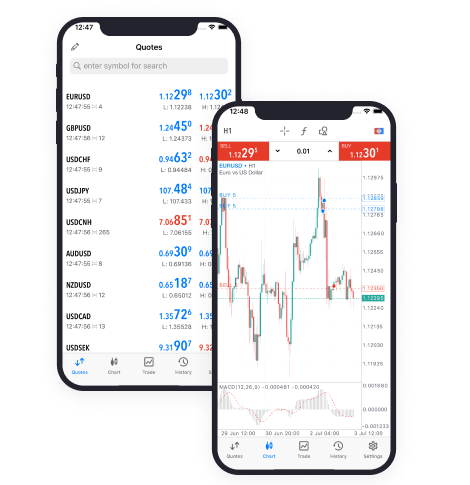
Optimizing Metatrader 4 for windows can enhance your trading experience, making it more efficient and effective. Here are some tips to help you get the most out of the platform:
Firstly, customize your workspace to suit your trading style. MT4 allows you to rearrange charts, change colors, and set up multiple screens if needed. Organize your Market Watch window to monitor your preferred assets and create templates for quick chart setups.
Utilize MT4’s extensive library of technical indicators and analytical tools. Experiment with different indicators to find combinations that work best for your trading strategy. Save frequently used templates and profiles to streamline your analysis process.
Take advantage of keyboard shortcuts in MT4 to navigate quickly between different windows and execute trades faster. Learn shortcuts for opening new charts, placing orders, and switching between timeframes to improve your efficiency during trading sessions.
Use the Strategy Tester feature to backtest your trading strategies using historical data. This allows you to assess the viability of your strategies under various market conditions before risking real capital. Adjust parameters based on test results to optimize your strategies.
Stay informed with MT4’s news and alert features. Set up price alerts for specific asset prices or economic events that could impact your trades. Utilize economic calendars integrated into the platform to track important announcements and economic indicators.
Regularly update MT4 to access new features and security patches. Updates are essential for maintaining platform stability and ensuring compatibility with your broker’s services.
By following these tips, you can optimize MetaTrader 4 for Windows to suit your trading needs and improve your overall trading performance.

Metatrader 4 (MT4) has long been regarded as the gold standard in online trading platforms, and for good reason. Its unparalleled combination of functionality, reliability, and user-friendliness has made it the platform of choice for millions of traders worldwide.
At the heart of MT4’s appeal is its flexibility. With flexible leverage options, traders can tailor their risk exposure to suit their individual preferences and trading strategies. This level of control empowers traders to optimize their returns while minimizing potential losses—a crucial aspect of successful trading.
The versatility of MT4 extends beyond leverage options. Its intuitive interface allows traders to effortlessly navigate the platform, whether they’re analyzing market trends, executing trades, or managing their portfolios. Furthermore, MT4’s extensive range of technical analysis tools equips traders with the insights they need to make informed trading decisions.
One of the key strengths of MT4 is its ability to automate trading strategies through the use of expert advisors (EAs) and custom indicators. By harnessing the power of MT4’s built-in programming language, MQL4, traders can create bespoke trading algorithms that execute trades automatically based on pre-defined criteria. This not only saves time and effort but also eliminates the emotional bias that can often cloud judgment in manual trading.
Security is paramount in the world of online trading, and MT4 takes this responsibility seriously. With state-of-the-art encryption technology and robust security protocols, MT4 ensures that traders’ sensitive information remains safe from cyber threats. Additionally, MT4 offers multi-factor authentication options, further enhancing the security of accounts.
In conclusion, Metatrader 4 is more than just a trading platform—it’s a powerful toolkit that empowers traders to unlock their full potential in the financial markets. With its flexible leverage options, user-friendly interface, advanced automation capabilities, and stringent security measures, MT4 continues to set the standard for excellence in online trading.